1.0 Overview
We will discuss the differences between a Shallow and Deep copy of a Java Object in this article.
2.0 Shallow Copy of an Object
For an example let’s consider the ShoppingCart class defined here.
import java.util.List;

public class ShoppingCart {

    private String cartName;
    private List<String> items;

    public ShoppingCart(String cartName, List<String> items) {
        this.cartName = cartName;
        this.items = items;
    }

    // Getters and Setters removed for simplicity

    @Override
    public String toString() {
        return "ShoppingCart [cartName=" + cartName + ", items=" + items + "]";
    }
}
It has an instance variable to hold a string variable as cartName and an ArrayList object to hold a list of string values to maintain items added to the cart.
And let’s try an example where we can create a shallow copy of the above ShoppingCart.
public ShoppingCart shallowCopy(ShoppingCart shoppingCart, String cartName) {

    ShoppingCart shallowCopy = new ShoppingCart(cartName, shoppingCart.getItems());
        return shallowCopy;
    }
}
Now we will execute the shallowCopy() method and check the output.
import java.util.ArrayList;
import java.util.List;

public class Main {

    public static void main(String[] args) throws CloneNotSupportedException {

        ObjectCopyService objectCopyService = new ObjectCopyService();

        ShoppingCart sourceShoppingCart = new ShoppingCart("MyCart", new ArrayList<String>(List.of("Bread"))); // 1
        ShoppingCart shallowCopy = objectCopyService.shallowCopy(sourceShoppingCart, "ShallowCopy"); // 2

        shallowCopy.getItems().add("Butter"); //3

        System.out.println(String.format("Source Shopping Cart : %s", sourceShoppingCart));
        System.out.println(String.format("Shallow Copy of Shopping Cart : %s", shallowCopy));
    }
}
Let’s find out the code explanation based on commented lines.
1 – Instantiate a new object of ShoppingCart by setting the cartName to “MyCart” and create an ArrayList object by adding a string item called “Bread”.
2 – Execute the shallowCopy() method by passing the ShoppingCart instantiate as line 1, and passing a name to update cartName of the copied object.
3 – Assign “Butter” to the copied object.
According to the shallow behavior, it will create a new instance after copying, and instance variables will copied from the source object. And if we change it, the changed name should be available in the copied object only.
It will not create a new instance for ArrayList which is an external reference object in the source object, instead, it will make a reference to the copied object as per the diagram below.

Once we execute the main class, we can experience the behavior illustrated in the above diagram.
Source Shopping Cart                   : ShoppingCart [cartName=MyCart, items=[Bread, Butter]]
Shallow Copy of Shopping Cart  : ShoppingCart [cartName=ShallowCopy, items=[Bread, Butter]]
According to the execution output, the same items object is referenced to the source and copied objects. Once we update the copied object items to add “Butter” as a new item, it has been updated in the object referenced by sourceShoppingCart as well. This confirms both items references in source and copied objects are pointing to the same object.
3.0 Deep Copy of an Object
Deep copy will create instances for all the reference objects in the source object that is getting copied.
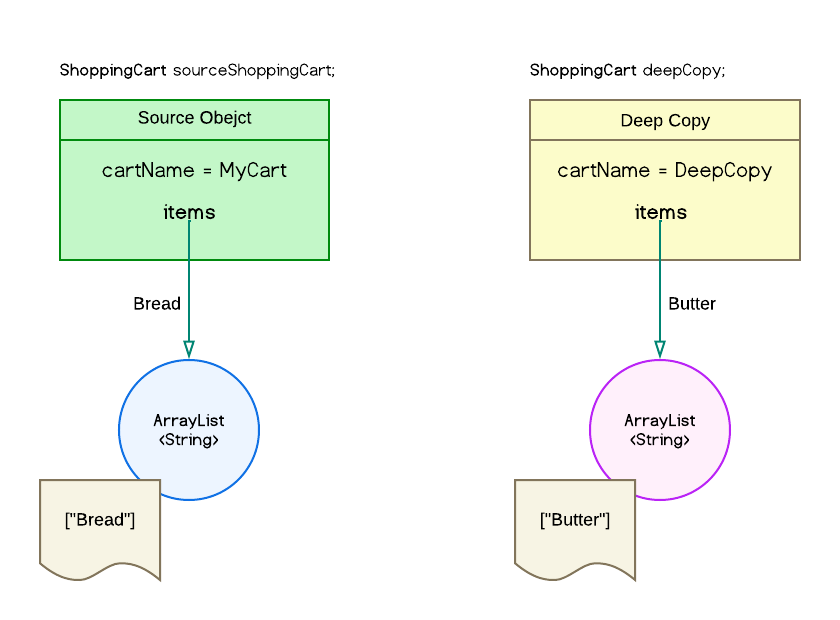
According to the diagram, the copy will create its own ArrayList object to hold the cart items.
We can implement a deep copy of an object according to this example.
class ObjectCopyServices {

    public ShoppingCart deepCopy(ShoppingCart shoppingCart, String cartName) {

        ShoppingCart deepCopy = new ShoppingCart(cartName, shoppingCart.getItems()); // 1

        ArrayList<String> itemList = new ArrayList<String>(); // 2

        shoppingCart.getItems().stream().forEach(t -> itemList.add(t)); // 3

        deepCopy.setItems(itemList); // 4

        return deepCopy;
    }
}
The code explanation based on the commented lines;
1 – Create a copy of the object, this will be a shallow copy initially.
2 – Instantiate a new ArrayList object.
3 – Iterate through all the items in the source shopping cart items list and copy all the items into itemList ArrayList.
4 – Assign the new ArrayList items to deepCopy referenced object.
Now let’s run the example of deep copy.
import java.util.ArrayList;
import java.util.List;

public class Main {

    public static void main(String[] args) {

        ObjectCopyService objectCopyService = new ObjectCopyService();

        ShoppingCart sourceShoppingCart = new ShoppingCart("MyCart", new ArrayList<String>(List.of("Bread")));
        ShoppingCart deepCopy = objectCopyService.deepCopy(sourceShoppingCart, "DeepCopy");
        deepCopy.getItems().add("Butter");

        System.out.println(String.format("Source Shopping Cart : %s", sourceShoppingCart));
        System.out.println(String.format("Deep Copy of Shopping Cart : %s", deepCopy));
    }
}
Let’s execute the above example;
    Source Shopping Cart             : ShoppingCart [cartName=MyCart, items=[Bread]]
    Deep Copy of Shopping Cart  : ShoppingCart [cartName=DeepCopy, items=[Bread, Butter]]
According to the execution output, each object holds its own cartName. And “Butter” is only added to the item list of the copied object referenced by deepCopy.
This confirms the new object is a deep copy and all references are completely detached from the sourceShoppingCart object.
4.0 Cloning an Object
Java has an inbuilt object cloning method provided by the Object class where it creates a new shallow instance of the source object.
To implement cloning, we need to implement Cloneable marker interface in Java on the ShoppingCart class as in the example below.
public class ShoppingCart implements Cloneable { ... }
Then we need to override the clone method from the Object class to provide the copy implementation. After that, the updated ShoppingCart class will appear as below.
public class ShoppingCart implements Cloneable {

    private String cartName;
    private List<String> items;

    public ShoppingCart(String cartName, List<String> items) {
        this.cartName = cartName;
        this.items = items;
    }

    @Override
    public Object clone() throws CloneNotSupportedException {
        return super.clone();
    }

    // Getters and Setters
}
Let’s create a clone using Java default cloning, and we will change the cart name of the cloned copy to differentiate them.
public class ObjectCopyService {

    public ShoppingCart cloneCopy(ShoppingCart shoppingCart, String cartName) throws CloneNotSupportedException {

        ShoppingCart cloneCopy = (ShoppingCart) shoppingCart.clone();

        cloneCopy.setCartName(cartName);

        return cloneCopy;
    }
}
Now let’s execute the clone copy with an instance of ShoppingCart.
import java.util.ArrayList;
import java.util.List;

public class Main {

    public static void main(String[] args) throws CloneNotSupportedException {

        ShoppingCart sourceShoppingCart = new ShoppingCart("MyCart", new ArrayList<String>(List.of("Bread")));
        ShoppingCart cloneCopy = objectCopyService.cloneCopy(sourceShoppingCart, "CloneCopy");
        cloneCopy.getItems().add("Butter");

        System.out.println(String.format("Source Shopping Cart : %s", sourceShoppingCart));
        System.out.println(String.format("Clone of Shopping Cart : %s", cloneCopy));
    }
}
Once we execute the cloneCopy() it will return this output.
    Source Shopping Cart   : ShoppingCart [cartName=MyCart, items=[Bread, Butter]]
    Clone of Shopping Cart : ShoppingCart [cartName=CloneCopy, items=[Bread, Butter]]
Now we can understand the sourceShoppingCart items list is shared with the cloneCopy object. Because the added “Butter” item on the copied object is reflected on the sourceShoppingCart.
This confirms the Java default clone does not instantiate the reference objects hence it complies with shallow behavior.
5.0 Deep Copy with Cloning
To create a deep copy of the source object with cloning we have to manually instantiate all the referenced objects in the cloned object. Then copy all the values from the source reference objects into the copy object items. We can achieve this by cloning reference objects from source object and assigning them to copy object.
Now let’s modify the cloneCopy() to create deepCloneCopy().
public class ObjectCopyService {

    public ShoppingCart deepCloneCopy(ShoppingCart shoppingCart, String cartName) throws CloneNotSupportedException {

        ShoppingCart deepCloneCopy = (ShoppingCart) shoppingCart.clone();

        ArrayList<String> itemsList = (ArrayList<String>) shoppingCart.getItems();

        deepCloneCopy.setItems((ArrayList<String>)itemsList.clone());

        deepCloneCopy.setCartName(cartName);

        return deepCloneCopy;
     }
 }
We can execute the deepCloneCopy() as below.
import java.util.ArrayList;
import java.util.List;

public class Main {

    public static void main(String[] args) throws CloneNotSupportedException {

        ShoppingCart sourceShoppingCart = new ShoppingCart("MyCart", new ArrayList<String>(List.of("Bread")));
        ShoppingCart deepClone = objectCopyService.deepCloneCopy(sourceShoppingCart, "DeepCloneCopy");
        deepClone.getItems().add("Butter");

        System.out.println(String.format("Source Shopping Cart : %s", sourceShoppingCart));
        System.out.println(String.format("Deep Copy By Cloning : %s", deepClone));
    }
}
The above code will produce this output.
    Source Shopping Cart  : ShoppingCart [cartName=MyCart, items=[Bread]]
    Deep Copy By Cloning  : ShoppingCart [cartName=DeepCloneCopy, items=[Bread, Butter]]
As we can notice, the source object and copied objects are completely detached without containing any shared objects. This complies with deep copy behavior.
To further reduce the implementation complexity without explicitly copying each object reference manually, there are some other libraries available to use such as;
- Gson / Jackson JSON Serialization
- Apache Commons
We can use one of the above libraries by evaluating their tradeoffs. And we need to consider how often copying is required in our code.
6.0 Conclusion
It is crucial to understand the clear difference between shallow copy and deep copy when creating copies of objects in Java. Because incorrect use of copies of objects will result in more error-prone code and it will introduce more bugs in our production code.
The example source codes are available here to try-out with two versions such as standard java project and springboot project.
 THISARA'S RESEARCH SPACE